 Ambience player & focus timer

A calm room for your screen: ambience, slow visuals, focus timers, clocks and big signs.
Focus Room plays Soundscape Atlas ambience scenes as a playlist with smooth crossfades, shapes them with a master equalizer, room reverb and stereo width, and fills the screen with slow, seamlessly repeating generative backgrounds. A Pomodoro, 52/17 or custom focus timer rings gentle chimes, a sleep timer fades everything out, and a local session log shows your week as a heatmap. The Display tab turns the screen into a clock (analogue, flip, binary, word clock in 17 languages, world clocks), a countdown to any moment in any time zone, a stopwatch with laps, named timers, a Tabata/HIIT/EMOM interval timer, a presenter timer or a big sign. Nothing plays until you press Play, and nothing leaves your device.
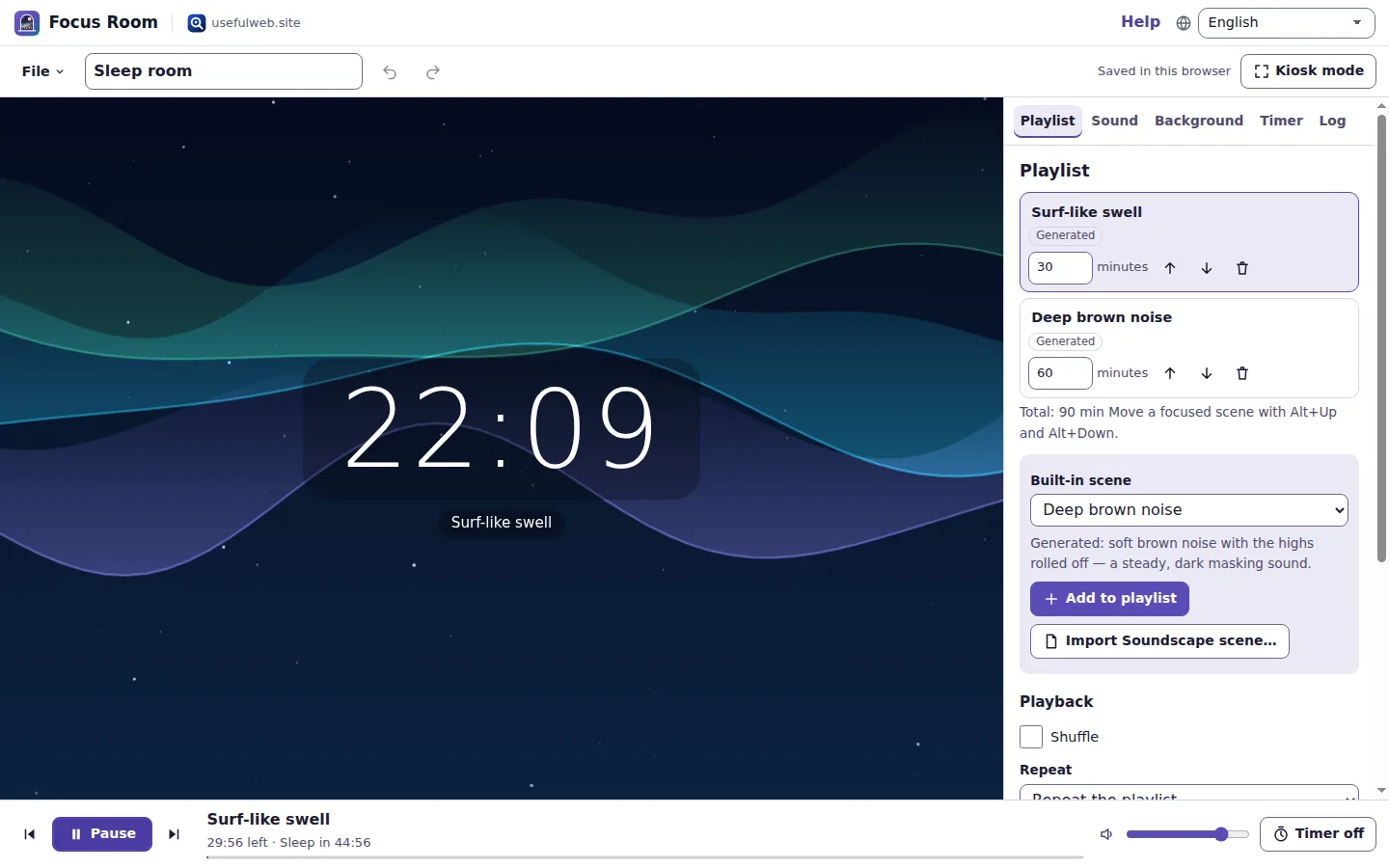
Screenshots
- A playlist of scenes over a slow background
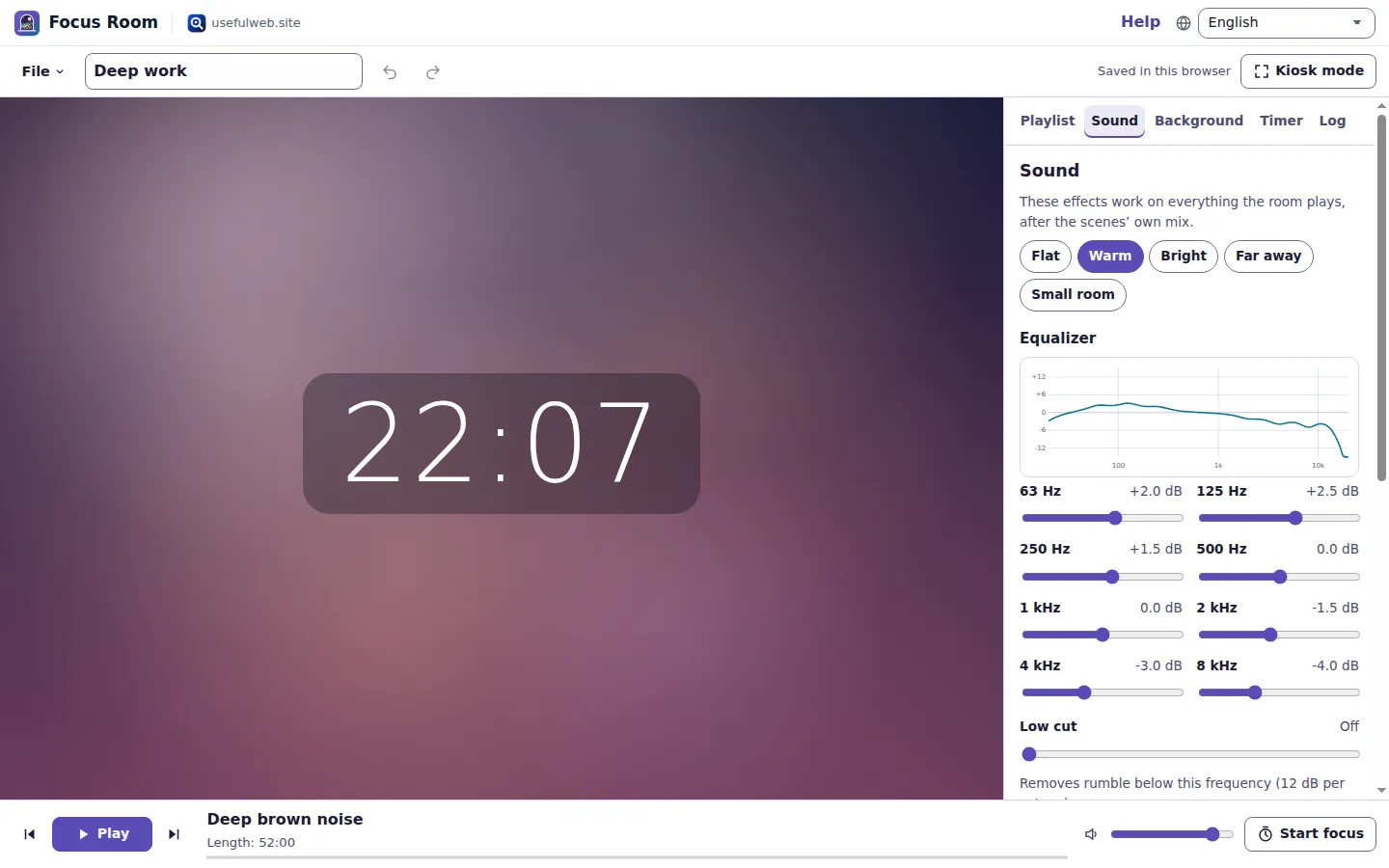 Master effects with a live EQ curve
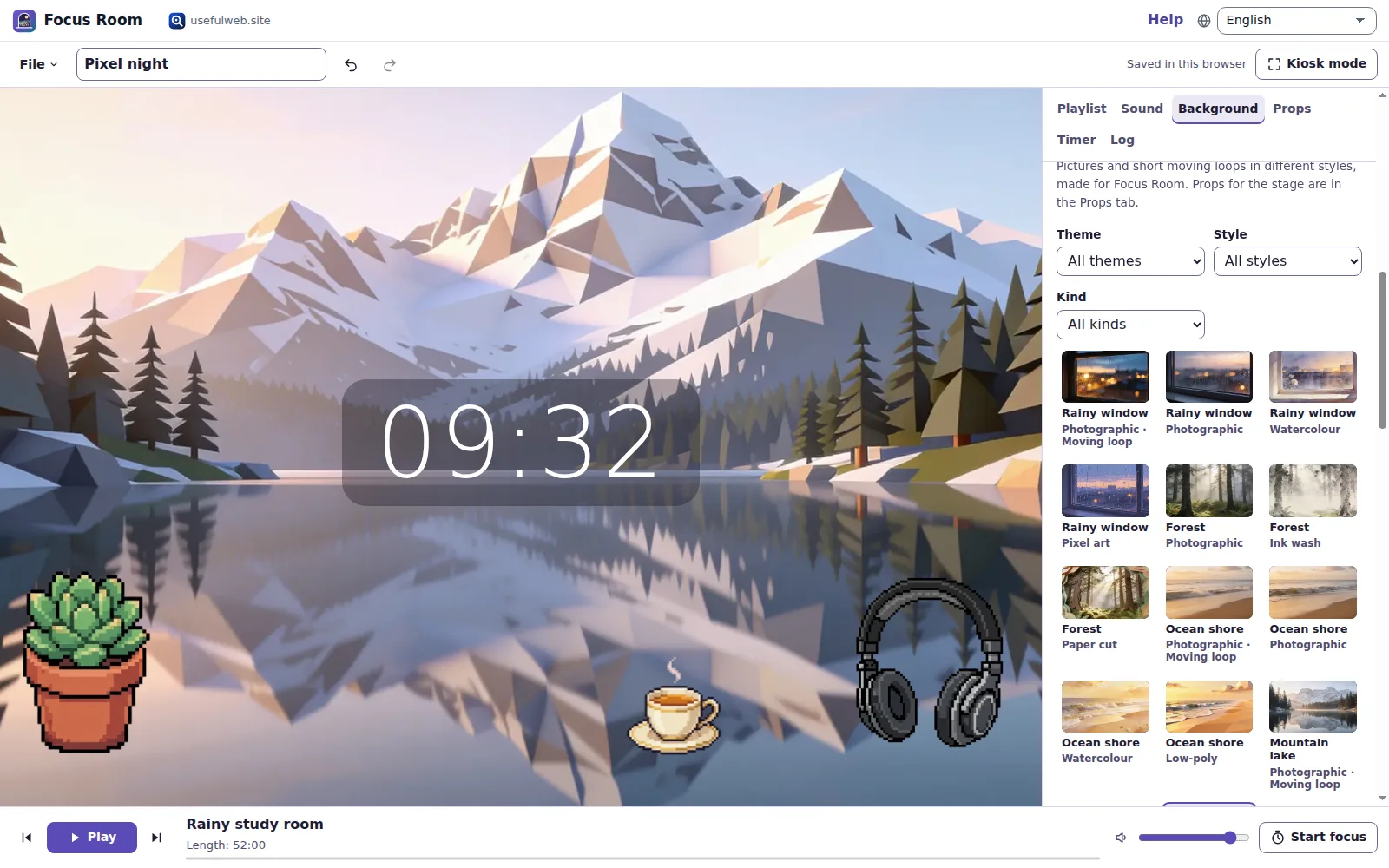 Art backgrounds in many styles
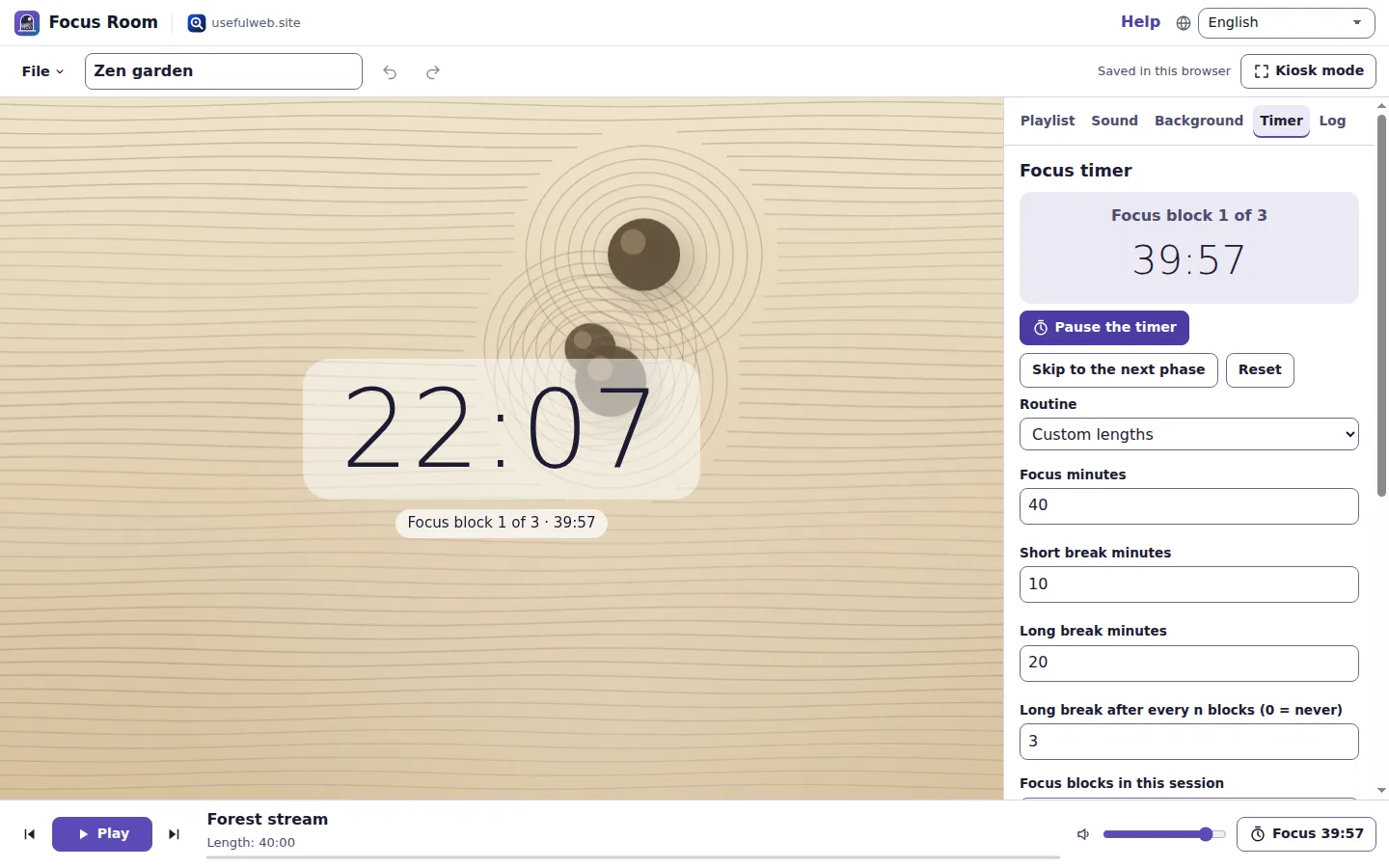 Focus timer with gentle chimes
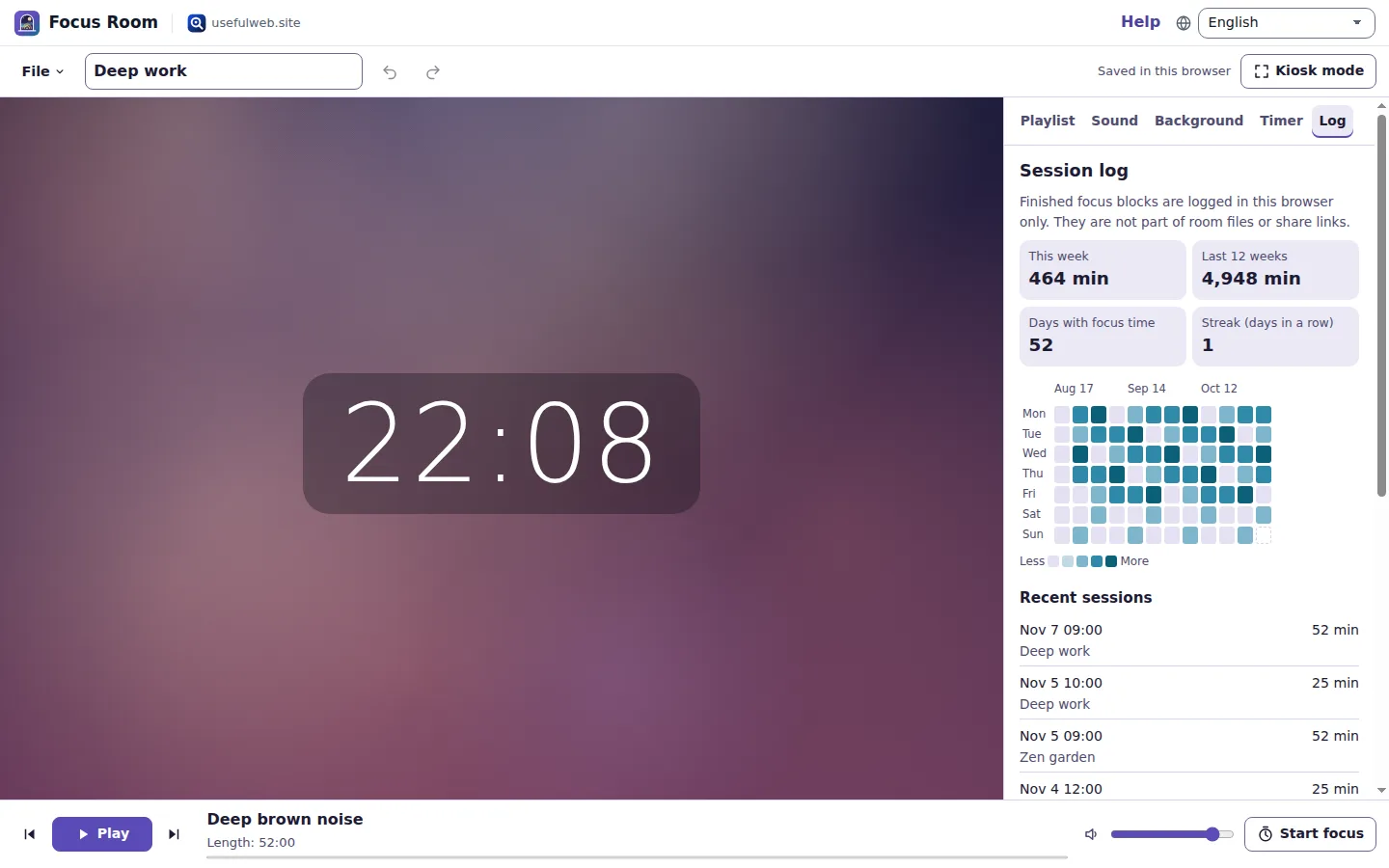 Your week as a heatmap
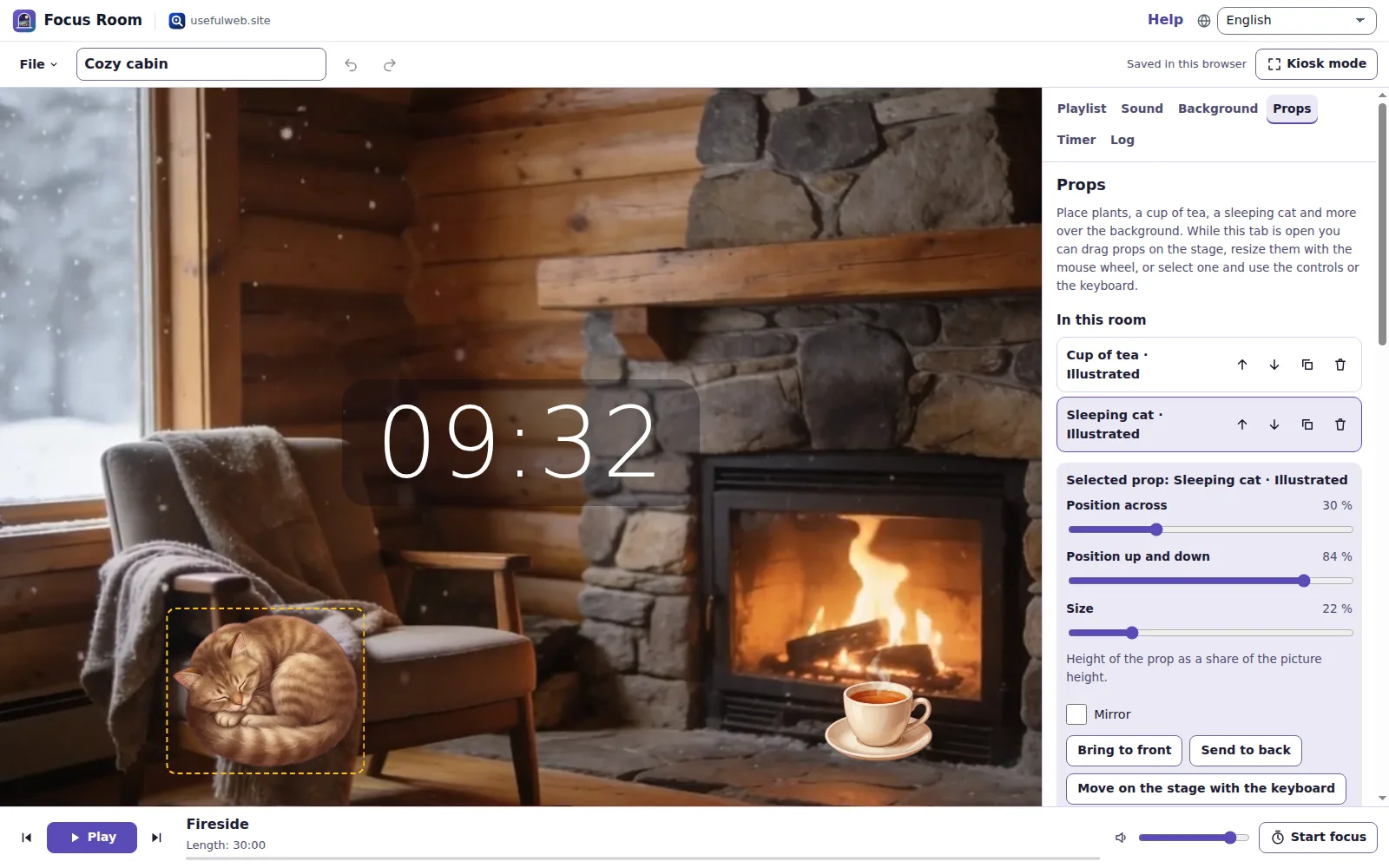 Props you can drag, resize and layer
Features
Ambience playlists
Put scenes in order with their own lengths, shuffle or repeat them, and let each one melt into the next with an equal-power crossfade of up to 30 seconds.
Built-in and Soundscape scenes
Seventeen scenes from brown noise to a fireside and the Soundscape Atlas worlds, plus your own Soundscape mixes from a file or “Open in Focus Room”.
Graphic EQ and cuts
Eight octave bands from 63 Hz to 8 kHz, low cut and high cut, with a live response curve computed from the same filters the browser runs.
Room, width, limiter and presets
Place everything in a small room, a hall or a cave, widen the stereo image, keep peaks soft, or start from Warm, Bright, Far away or Small room.
Nine generative backgrounds
Fog, aurora, caustics, rain on glass, stars, zen sand, a lava lamp, Lissajous curves and light rays — seamless, seeded, in eight colour themes, calm with reduced motion.
Art backgrounds, loops and props
Thirty-nine pictures in seven styles, eight seamless moving loops and thirty props — plants, tea, a sleeping cat — to drag onto the stage.
Kiosk mode
Full screen with a large clock, controls that hide themselves, a screen that stays awake while it plays, and Esc to leave.
Focus and sleep timers
Pomodoro, 52/17 or your own cycles with soft chimes and a calendar file of the plan; a sleep timer fades the room out and stops.
Session log and heatmap
Finished focus time is logged in this browser and shown as a twelve-week heatmap with your streak; export it as CSV or clear it.
Clock faces and world clocks
Digital, analogue, flip, binary or a word clock in 17 languages, with up to six world clocks in a strip — full screen on a TV, tablet or second monitor.
Countdowns in any time zone
Days to seconds until a moment anywhere, working days without weekends and public holidays, a calendar file, and New Year in every time zone.
Stopwatch, laps and named timers
Laps with the best and the slowest marked and a CSV export, plus kitchen or exam timers that run side by side and chime when they end.
Interval timer with cues
Tabata, HIIT, EMOM or your own rounds with chimes, 3-2-1 beeps and spoken cues, and a cue-track WAV to play along on any speaker.
Big sign and presenter timer
Text as big as the screen allows, in seven colour pairs or as a marquee, kept in a link; and a talk timer that turns amber, then red.
Render to WAV
Mix the playlist with its crossfades and effects into a WAV file on your device — the same renderer as the playlist tool.
Private and local
Rooms autosave with recent rooms, undo and redo, room files and share links; the session log never leaves the browser.


Templates
Start from a ready-made project and change it to fit.
Deep work
Brown noise, a rainy study and pink rain in 52-minute blocks with 17-minute breaks, warm sound and drifting fog.
Pomodoro café
Four 25-minute Pomodoros with a café-like murmur, a fireside and light rain, rain on glass in front of city lights.
Ocean floor
A submarine, surf-like swells and cavern drips under rippling caustics, sounding far away.
Zen garden
A forest stream and a night wind over raked sand, with 40-minute focus blocks and 10-minute breaks.
Night shift
Spacecraft hum, night wind and deep brown noise under a slow starfield, bright EQ, 52/17 blocks.
Sleep room
Surf-like swells and brown noise that fade out after 45 minutes, under aurora ribbons. No focus timer.
Forest with real recordings
Soundscape Atlas worlds with real Wikimedia Commons recordings — a Bavarian dusk and an alpine brook — between forest light rays.
Cozy cabin
A crackling fire in a snowy cabin as a moving loop, a sleeping cat and a cup of tea in front, fireside and night wind, Pomodoro blocks.
Pixel night
A pixel-art city at night behind the window, pixel headphones, a succulent and tea on the sill, with rain and brown noise in 52/17 blocks.
New Year countdown
A full-screen countdown to midnight on 1 January 2027 in Berlin with flip digits over the northern lights, and a fireside for the party.
World clock desk
An analogue clock with New York, London, Tokyo and Sydney in a strip below, over drifting fog with deep brown noise.
Tabata workout
Eight rounds of 20 seconds work and 10 seconds rest with chimes and 3-2-1 beeps over a lava lamp; the music stays soft.
Talk timer
A 20-minute presenter timer that turns amber with five minutes left and red for the last minute, then counts the overtime.
Built-in tools
Focus Room uses these tools. Each one also has its own page and works on its own, in the browser, through the JSON API and through MCP.
- Focus Room Playlist Renderer Focus Room engineMix a playlist of generated ambience scenes with crossfades and master effects into a WAV.
- Focus Room Focus Timer Planner Focus Room enginePlan Pomodoro, 52/17 or custom focus blocks and export them as a calendar file.
- Focus Room Countdown Focus Room engineTime left until a moment in any time zone, with working days, holidays and a calendar file.
- Focus Room World Clock Focus Room engineLocal times, UTC offsets and daylight saving in several cities, plus the best meeting hours.
- Focus Room Interval Timer Planner Focus Room engineHIIT, Tabata and EMOM schedules with every phase and a cue-track WAV to play along.
- Focus Room Big Sign Focus Room engineMake text as big as the screen allows: a sign as SVG, PNG and printable PDF.
- Ambience Generator (rain, wind, stream, fire, hum, drone) Focus Room engineSynthesize rain, wind, water, fire, room hum or a drone as a seamless-loop WAV.
- Noise Generator (white, pink, brown) Focus Room engineMake white, pink, brown, blue or violet noise as a WAV file and check its spectrum.
- Room Reverb for WAV Files Focus Room engineAdd room, hall, cathedral or cave reverb to a WAV file with a known reverberation time.
For AI agents
Focus Room runs on a deterministic engine. The same functions are available as tools with a JSON API and MCP, so scripts and AI agents get exactly the results the app shows.
- Focus Room Playlist Renderer – Mix a playlist of generated ambience scenes with crossfades and master effects into a WAV.
Tool page ·POST https://focusroom.usefulweb.site/api/v1/tools/focusroom-playlist-render/calculate· MCPfocusroom_playlist_render - Focus Room Focus Timer Planner – Plan Pomodoro, 52/17 or custom focus blocks and export them as a calendar file.
Tool page ·POST https://focusroom.usefulweb.site/api/v1/tools/focusroom-focus-timer/calculate· MCPfocusroom_focus_timer - Focus Room Countdown – Time left until a moment in any time zone, with working days, holidays and a calendar file.
Tool page ·POST https://focusroom.usefulweb.site/api/v1/tools/focusroom-countdown/calculate· MCPfocusroom_countdown - Focus Room World Clock – Local times, UTC offsets and daylight saving in several cities, plus the best meeting hours.
Tool page ·POST https://focusroom.usefulweb.site/api/v1/tools/focusroom-world-clock/calculate· MCPfocusroom_world_clock - Focus Room Interval Timer Planner – HIIT, Tabata and EMOM schedules with every phase and a cue-track WAV to play along.
Tool page ·POST https://focusroom.usefulweb.site/api/v1/tools/focusroom-interval-plan/calculate· MCPfocusroom_interval_plan - Focus Room Big Sign – Make text as big as the screen allows: a sign as SVG, PNG and printable PDF.
Tool page ·POST https://focusroom.usefulweb.site/api/v1/tools/focusroom-big-sign/calculate· MCPfocusroom_big_sign - Ambience Generator (rain, wind, stream, fire, hum, drone) – Synthesize rain, wind, water, fire, room hum or a drone as a seamless-loop WAV.
Tool page ·POST https://focusroom.usefulweb.site/api/v1/tools/soundscape-ambience-generator/calculate· MCPsoundscape_ambience_generator - Noise Generator (white, pink, brown) – Make white, pink, brown, blue or violet noise as a WAV file and check its spectrum.
Tool page ·POST https://focusroom.usefulweb.site/api/v1/tools/soundscape-noise-generator/calculate· MCPsoundscape_noise_generator - Room Reverb for WAV Files – Add room, hall, cathedral or cave reverb to a WAV file with a known reverberation time.
Tool page ·POST https://focusroom.usefulweb.site/api/v1/tools/soundscape-reverb/calculate· MCPsoundscape_reverb
- MCP endpoint (Streamable HTTP):
https://focusroom.usefulweb.site/mcp - Project file format (JSON Schema): https://focusroom.usefulweb.site/project.schema.json
- OpenAPI description: /openapi.json · llms.txt · API & MCP
Build a project through the API, then open it in the app with a link to https://focusroom.usefulweb.site/app#project=<base64url JSON>.
Import & export
Import
- Focus Room room (.focusroom.json)
- Soundscape Atlas scene (.soundscape.json, file or App Bridge)
- Share link (#project=)
- Sign link (#sign=)
Export
- WAV (16-bit stereo, playlist with crossfades and effects)
- Focus Room room (.focusroom.json)
- Calendar file of the focus plan (.ics)
- Session log (.csv)
- Credits of the recordings (.txt)
- Share link
- Countdown event (.ics)
- Stopwatch laps (.csv)
- Interval cue track (WAV)
- Big sign (SVG, PNG, PDF)
- Sign link
Keyboard shortcuts
| Keys | Action |
|---|---|
| Space | Play or pause (when no button has focus) |
| N | Next scene |
| P | Previous scene |
| T | Start or pause the focus timer |
| K | Kiosk mode on or off |
| G | Next background |
| 1 … 7 | Open Playlist, Sound, Background, Timer, Log, Props or Display |
| Arrow keys / + / − / Page Up / Page Down | Move, resize or re-layer the focused prop on the stage (Props tab) |
| Alt + Up / Alt + Down | Move the focused playlist scene |
| Esc | Leave kiosk mode or close a dialog |
| Ctrl + Z | Undo |
| Ctrl + Shift + Z | Redo |
| Ctrl + S | Save room file |
| Ctrl + O | Open a room or scene file |
| ? | Show keyboard shortcuts (single-key shortcuts can be switched off there) |
Frequently asked questions
Will Focus Room start playing by itself?
No. Sound only starts when you press Play or test a chime. Opening a room, a template or a link never plays anything.
Where do the sounds come from?
Most scenes are generated on your device by the Soundscape Atlas audio engine from a seed: noise colours, rain, wind, water, fire, hum and drones. Some Soundscape worlds and your own Soundscape scenes contain real field recordings from Wikimedia Commons; those stream from upload.wikimedia.org when they play, and the credits list them.
How do I bring my own Soundscape mix in?
In Soundscape Atlas choose File → Open in Focus Room, or save the scene as a .soundscape.json file and open it here with Ctrl+O. It becomes a playlist entry. Audio you imported into Soundscape Atlas stays in that app and is left out.
What does equal-power crossfade mean?
While one scene fades out and the next fades in, their gains follow a cosine and a sine curve. The sum of their powers stays constant, so two different ambiences neither dip nor bulge in loudness during the change.
Do the backgrounds use a lot of power?
They are drawn at 15, 30 or 60 frames per second (30 by default) at screen resolution, and pause in background tabs. With reduced motion the app shows still images that crossfade every 20 seconds instead. Art pictures draw nothing after loading; moving loops are short H.264 clips that the graphics hardware decodes, play muted, pause in background tabs and show a still picture with reduced motion.
Where do the art backgrounds and props come from?
They were generated for Focus Room with AI image and video models through OpenArt, picked by hand and ship with the app. They show no people and no brands. Rooms and share links store only their names, so a shared room shows the same pictures for everybody and nothing is uploaded.
What is stored about my focus sessions?
Only the date, start time, focused minutes and room name of each finished block, in this browser. The log is not part of room files or share links. Export it as CSV or clear it in the Log panel.
Why does the screen stay on?
In kiosk mode Focus Room asks the browser for a screen wake lock while it plays, so the display does not sleep. It is released when you leave kiosk mode, pause or switch tabs.
How do I put a clock or a countdown on a TV or second screen?
Open the Display tab, pick Clock, Countdown or another mode and press Full screen. Esc leaves it. While a display runs full screen, Focus Room asks the browser to keep the screen awake.
How are working days counted in a countdown?
From today up to the day of the event, without the event day: every date that is not one of your weekend days and not a public holiday of the chosen country. Holidays come from the RuleDate data for 16 countries (2024–2030); company holidays are not included.
Can the interval timer speak?
Yes, if you switch on spoken cues: the browser’s own speech voice says “Work”, “Rest” and the round. Voices differ between devices and some have none; the chimes and beeps always work, and the downloadable cue track contains only chimes and beeps.
What does a sign link contain?
The text, the colours and the marquee setting of the sign, inside the link after #sign=. Nothing is uploaded; whoever opens the link sees the sign full screen.
Can I use the rendered WAV in my own videos?
Generated scenes are yours to use. If a rendered playlist contains Wikimedia Commons recordings, follow their licences: the credits list each recording with its licence and author.
Limitations
What Focus Room does not do (yet):
- Playback follows the browser’s audio clock; phones may pause audio and timers in background tabs or with the screen off.
- Crossfades are triggered by a page timer: in background tabs a change can start up to about a second late.
- The limiter is a soft clipper (tanh knee), not a look-ahead broadcast limiter; very loud mixes can still sound compressed.
- Recordings come from Wikimedia Commons and need a connection; the server playlist tool renders only generated scenes.
- The WAV render is limited to 12 scenes and 10 minutes; long rooms are rendered with shortened scenes.
- Wake lock and full screen depend on the browser; some browsers ignore them or ask first.
- The session log lives in this browser only and is not part of backups made with room files.
- Generated scenes imitate rain, surf or a café with filtered noise; they are not recordings of those places.
- Art backgrounds and props are AI-generated pictures, not photographs or paintings of real places; small details can look odd up close.
- Moving loops are about six seconds long and 1280 pixels wide: on very large screens they look softer than the pictures, and the loop point is a short crossfade.
- You cannot add your own pictures as backgrounds or props; rooms only refer to the built-in art by name.
- Clocks follow the device clock and its time-zone data; countdowns far in the future use today’s time-zone rules.
- Phones and tablets may pause timers, chimes and spoken cues in background tabs or with the screen off; iOS mutes web audio with the silent switch.
- The stopwatch counts to the hundredth of a second on screen; browsers deliver timer events in steps of a few milliseconds.
- The word clock rounds to the nearest five minutes and uses one common everyday phrasing per language.
- Big signs use the bundled Noto fonts; rare Chinese, Japanese or Korean characters and emoji are not included.
Tutorials
Learn Focus Room step by step.
- Your first focus room in five minutesOpen a template, press Play, start a Pomodoro and learn the parts of the Focus Room workspace — stage, panels and player.Beginner 5 min
- Playlists and crossfadesAdd built-in scenes, set their lengths, reorder them with the keyboard, shuffle or repeat, and choose how long one scene melts into the next.Beginner 7 min
- Shape the sound with EQ, room and widthUse the sound presets, the eight-band equalizer with its response curve, low and high cut, room reverb, stereo width, volume and the gentle limiter.Intermediate 8 min
- Backgrounds and kiosk modeChoose one of nine generative backgrounds, change its seed, colours and speed, show the clock, and turn a second screen into a calm full-screen window.Beginner 6 min
- Focus timer, chimes and your session logRun Pomodoro, 52/17 or your own cycles with gentle chimes, quieter breaks and a calendar file, then read your week in the session heatmap.Beginner 7 min
- Soundscape scenes, WAV and sharingBring your own Soundscape Atlas mixes into a playlist, render the playlist to a WAV file, credit the recordings, and share a room as a link — also from the API.Intermediate 8 min
- Art backgrounds, moving loops and propsPick a painted, pixel-art or photographic background or a short moving loop, then place plants, tea, a sleeping cat and other props over it with the mouse or the keyboard.Beginner 7 min
- Clocks, countdowns and world clocks on a big screenTurn the stage into a full-screen clock — digital, analogue, flip, word clock or binary — with world clocks, or a countdown to any moment in any time zone.Beginner 7 min
- Stopwatch, timers, intervals, talk timer and big signsTime laps with the stopwatch, run named kitchen or exam timers, train with Tabata or HIIT cues, keep a talk on time and show a big sign.Beginner 8 min
Ready to try it?
Other apps
-

Twinworks
Factory digital twin & production simulation
Model a production line, simulate it and find the bottleneck — free, in your browser.
-

Chainscope
Web3 investigation desk
Investigate transactions, bridges, contracts, DAOs and wallets in one case file.
-

Lumina
Photo editor & image toolkit
Bring out what you saw. A free photo studio, right in your browser.
-

RavingDesk
Paper trading & data workspace
Practise trading on paper and chart your data: orders, risk, datasets, analyses, reports.
-

Soundscape Atlas
Sound map & ambience studio
Find real field recordings on a world map and mix them into calm, editable soundscapes.
-

Ledgerly
Household finance & life-admin desk
Budgets, bills, subscriptions, loans, contracts and deadlines on one private desk.
-

Ohmforge
Virtual electronics workbench
Draw a circuit, switch it on, and measure it with real-feeling bench instruments.
-

Flipline
Drawing, storyboards & animation
A few drawings. A little life. Make a flipbook in your browser.
-

Hearth
Home & travel planner
Plan meals, chores, home care, moves, trips and good days for your household in one place.
-

Kerfwise
Cabinet & furniture CAD
Design cabinets and furniture, get cut lists, optimised sheet layouts, costs and drawings.
-

ObscurIQ
OSINT case desk
Organize public-source research: cases, a research log, pivots and indicators.
-

Proofline
Math notebook
Solve, graph, test and visualise in one notebook — with data, findings and a report.
-

Reelcraft
Audio, video & image batch studio
Audio, video & image batch studio: cut, convert, compress, subtitle, reframe
-

Opsdeck
Developer & ops workbench
One deck for CI failures, cron, traces, k8s events, API diffs, query plans and Terraform.
-

Renderloom
3D scene & material studio
Shape a scene. Find its light. Keep every idea editable.
-

Paperwell
Document studio: PDFs, OCR, redaction, forms & contract reading
Your paperwork in one dossier: PDF tools, OCR, redaction, forms and contract reading.
-

Learning Shorts
Animated explainer video studio
Turn an idea into a narrated, animated short video with presenters, props and captions.
-

Agentlab
AI-agent & LLM workbench
Test an AI agent before release: permissions, traces, costs, citations and output checks.
-

Keysmith
Crypto & secrets lab
Audit certificates, keys, TLS and passwords in one lab; secrets stay on your device.
-

Pageboard
Website inspiration boards
Collect website references, sort them with tags and arrange them on a moodboard.
-

Threadsmith
Embroidery digitizing studio
Draw or import artwork, turn it into stitches, export DST, PES, JEF or EXP files.
-

Signalhouse
Website & internet infrastructure inspector
Inspect DNS, TLS, mail, CDN and routing of all your domains — and see what changed.
-

Fieldday
Sports club & training organiser
Fixtures, brackets, ratings and training plans for your club — in one workspace.
-

Provenance
Software supply-chain security desk
SBOMs, CVEs, containers and licences in one risk register — free, in your browser.
-

Kinetica
Robot motion studio
Simulate robot arms in your browser: kinematics, trajectories, collisions, program export.
-

Panelcraft
Comic books & figure references
Shape a page. Arrange a book. Give your story a voice.
-

Bundlekeep
Local project backup
Back up projects from every usefulweb app into one file, check it and restore any part.
-

Tonegrid
Tone matrix & beat sequencer
Light up squares to build melodies, beats and acid bass, then arrange them into songs.
-

Printshop
Printables studio
QR codes, calendars, labels, puzzles and posters — print-perfect PDFs in seconds.
-

Skyfold
Sky & space atlas
See the sky of any place and moment, plan eclipses and satellite passes, print star maps.
-

Playcards
Card games table
33 card games from Skat and Jass to Scopa and Daifugō, vs the computer, at home or online.
-

Cartograph
Map posters & route art
Turn a place into a map print, a GPS-art route, a fair meeting point or a true-size map.
-

Sizewise
Scale & big-number visualiser
Make sizes, amounts and big numbers feel real: to-scale lineups, fit counts and stacks.
-

Deckwright
Slide deck studio
Write Markdown, get an accessible slide deck — charts, diagrams, PDF, HTML and PowerPoint.